
This article is an explanatory guide covering the blocking of embedded maps by Google Maps in the absence of user consent. Our consent management platform helps you comply with regulations governing the management of geographic maps provided by third-party services.
Google Maps integrations and nFADP
Google Maps is a widely used tool for displaying interactive maps or driving directions on a website. However, its integration raises important data protection issues. In Switzerland, since the introduction of the nFADP on September 1, 2023, displaying a Google Maps map without the user’s prior consent is no longer compliant.
It’s also important to note that the use of Google Maps for legitimate purposes is very difficult to defend, as there are many other services that are much more privacy-friendly.
Why does this happen? When a Google Maps map is integrated into a web page, the user’s IP address is automatically transmitted to Google servers as soon as the page is loaded, even without any action on the user’s part. The service also uses marketing and analytical cookies to track visitors’ browsing behavior and profile them for advertising purposes.
An IP address constitutes personal data. Passing it on, along with other tracking information, without explicit consent violates the nFADP in Switzerland as well as the GDPR in Europe.
By blocking the display of maps until you have obtained the user’s consent, your site will comply with the law and reinforce visitor confidence by demonstrating a concrete commitment to their privacy.
How does biskoui block Google Maps?
Biskoui can block your Google Maps integrations to bring your site into compliance with nFADP and the European GDPR. We have developed a system that will block Google Maps until user consent has been collected. Your Google Maps maps will display a placeholder indicating to the visitor that their consent is required.
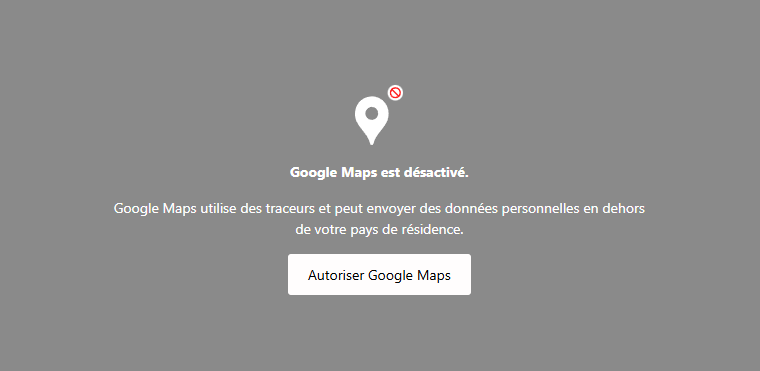
If the user clicks on “Allow Google Maps”, consent will be activated for Google Maps only. Once clicked, our blocking system will immediately disappear and display the map.
How do I activate Google Maps blocking with biskoui?
A. Add Google Maps service (one-time operation)
- Connect to the biskoui console (admin.biskoui.ch)
- Go to the Services menu and add the Google Maps service
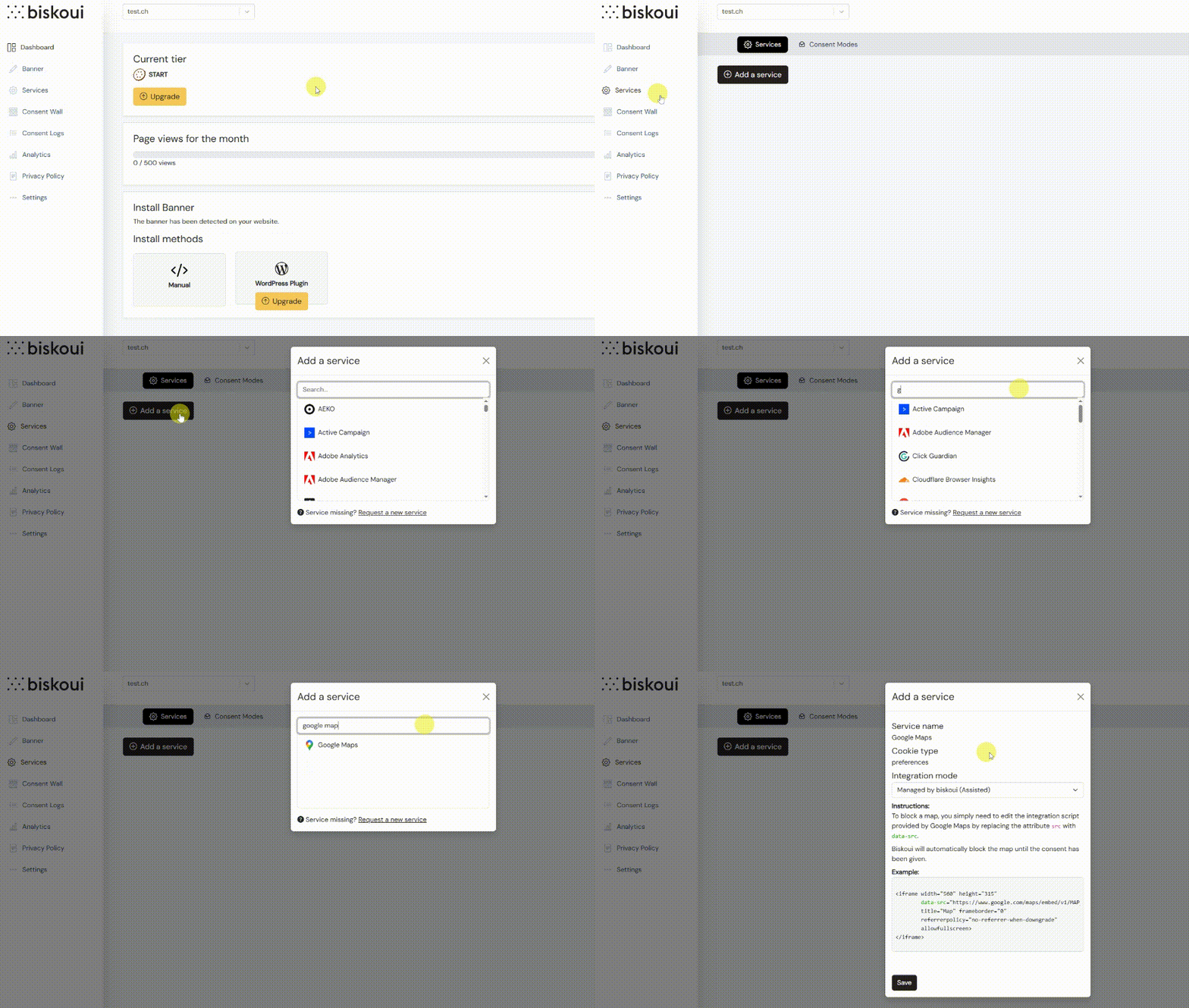
- Once the service has been selected, use the default integration mode Managed by biskoui (Assisted) and click Add
B. Enable blocking on your Google Maps (to be performed for each map integration)
Now that the Google Maps service has been added, you’ll need to modify your map integration scripts. When you want to integrate a Google Maps map into your website, Google provides an “iframe” integration script like this one:
<iframe src="https://www.google.com/maps/embed?pb=!1m18..." width="600" height="450" style="border:0;" allowfullscreen="" loading="lazy" referrerpolicy="no-referrer-when-downgrade"></iframe>To activate the map block, simply modify the parameter text calling the source src= and replace it with data-src=.
Before modifying the source parameter:
src="https://www.google.com/maps/embed?pb=XYZ"After modifying the source parameter:
data-src="https://www.google.com/maps/embed?pb=XYZ"This small manipulation allows biskoui to run, or not, the map integrator depending on your visitor’s consent status for Google Maps.
Please note: It is important to perform this operation for each Google Maps map on your website.
What happens if the user withdraws consent?
The next time the page is loaded, the biskoui blocking system will be reinstated until the user accepts the Google Maps service again.
OpenStreetMap — a privacy-friendly alternative to Google Maps
Alternatively, you can opt for OpenStreetMap, a collaborative open-source project that allows you to integrate interactive maps without resorting to proprietary services that collect personal data for marketing purposes. Unlike Google Maps, OpenStreetMap does not use marketing cookies, and keeps the collection of user information to a minimum. This more privacy-friendly solution helps you comply with data protection regulations, while offering your visitors a fluid, high-performance mapping experience.
Need help integrating your Google Maps?
Our support team is available at support@biskoui.ch